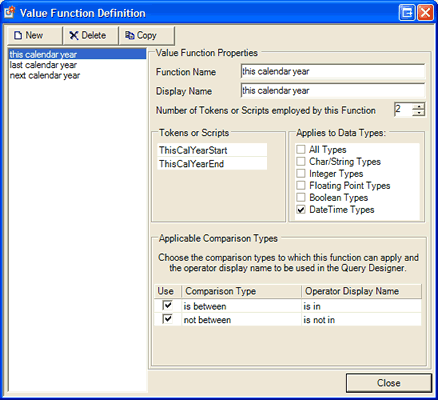
 You can use this dialog to manage the provided set of
value functions and to define your own using the inbuilt value function
tokens provided by SQL Designer. Here
is an explanation of the various fields on the dialog.
You can use this dialog to manage the provided set of
value functions and to define your own using the inbuilt value function
tokens provided by SQL Designer. Here
is an explanation of the various fields on the dialog.SQL Designer provides the ability for query criteria to be satisfied at run time using dynamically created value data for criteria.
For example, there are a number of supplied functions that allow the user to specify abstract values such as Last Financial Year or Next Calendar Month in a query and have the SQL Designer calculate the values that would be appropriate within the current context - which in this example, would be the current date. This allows the user to specify conditions such as OrderDate is in This Calendar Month and have SQL Designer translate it to OrderDate is between '2005-01-01' AND '2005-01-31'.
In addition to the supplied functions, you are free to add additional functions either by using SQL Designer's inbuilt token values that evaluate to specific dates, or by providing your own logic to calculate context dependent values within your host application. For a more detailed discussion of using Value Functions, refer to the developer documentation. For an example of implementing a custom Value function, refer to the source code in the provided sample application.
To allow you to easily manage a standard set of Value Functions, SQL Designer provides a user interface for that purpose.
You can use this dialog to manage the provided set of
value functions and to define your own using the inbuilt value function
tokens provided by SQL Designer. Here
is an explanation of the various fields on the dialog.
This is the name of the value function. It should not be changed once it is referenced by any queries as this is the name that is used by queries to reference the function.
The textual description that is used to represent the value function to the user. This description will be prepended with the appropriate operator display name (see below) depending on the comparison type that is being used in conjunction with the value function.
This setting adjusts the UI to present the correct number of Token entries for this value function. In our example of using a date range, you would typically use two values, however, you may for build more complex functions such as 'last calendar month or next calendar month' that would use four tokens. While the UI refers to Tokens or Scripts, Script Evaluation was not included in this release of SQL Designer but may be added in a future release.
It is important to specify what data types the value function may apply to. This will ensure that the function is not inappropriately applied to an invalid column causing invalid SQL to be produced.
This area will display all of the available global comparison types that can apply to the data types selected in the previous field. for each comparison type that you want the value function to be available, place a check in the 'Use' box and add an Operator Display Name as indicated. When building the query criteria, the value function will b e made available as a choice on the fields with supported data types and the comparison types that are checked to be used will be available as options for the value function.
SQL Designer is able to evaluate a number of in-built token values that may be used in Value Functions that are defined in global settings, and, may also be used by custom code in the host application that needs to obtain the value of these tokens at run time by calling the cQuery.GetTokenValue function. (refer developer documentation for more specific information)
Tokens are composite word text identifiers that evaluate to different values depending on the date and time that they are executed (or the date/time supplied as a reference date to the cQuery.GetTokenValue function)
The syntax for construction of a token is as follows:
[Last|This|Next][Cal|Fin{StartOfPeriod}][Year|Qtr|Month|Week]{Start|End}[Qualifier]
Where:
|
Syntax Element |
Description & Options |
|
[Last|This|Next] |
The period relative to the current period. E.g.: If you specify Last, the token will refer to the period immediately prior to the period in which the RefDate Date/Time ( or current date/time if no RefDate was specified) lies. |
|
[Cal|Fin{StartOfPeriod}] |
Specifies whether the token represents a Calendar period or a Fiscal (Financial) period. If a Fiscal period, you must specify the DayOfYear that the fiscal year starts in a normal non-leap year. The start of year day is specified as a left padded zero three digit number between 1 and 364. |
|
[Year|Qtr|Month|Week] |
The type of period that is required. Fiscal periods may only reference Year, Qtr and Month - there is no FiscalWeek period. {Start|End} Specifies whether the date that represents the beginning of the period is required, or, the date that represents the end of the period. |
|
[Qualifier] |
The qualifier is used to specify variations that may apply to different periods based on local custom. The only variation currently recognized is a modifier for the 'Week' period that specifies whether a week starts on Sunday or Monday. Use the keyword Sunday or Monday to specify the required start value and the keyword Saturday or Sunday to specify the required end value. |
Examples of fully formatted Tokens using these rules include:
LastFin041YearStart = The previous financial year where the start of each fiscal year lies on February 10th.
NextCalWeekEndSunday = The end date for next week where a week ends on Sunday (begins monday).
ThisCalQtrStart = The beginning date of this current calendar quarter.