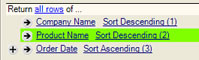
 To set up your user interface, drag one or two copies
of the uQueryPanel control to the appropriate area of your design surface(s)
and set:
To set up your user interface, drag one or two copies
of the uQueryPanel control to the appropriate area of your design surface(s)
and set:SQL Designer provides one main UI component for managing query design. This component (Connect4.SQLDesigner.WinUI.uQueryPanel) is used both for the editing of return set and criteria information.
Depending on the modality of your application, you will most likely need to provide one of the following sets of functionality:
Edit only the return set information for pre-defined queries.
Edit criteria only for pre-defined queries.
Both create and edit criteria and return set information for new and existing queries.
You may use a single instance of this component for editing the query, switching between return set and criteria modes, or, you may use two instances of this control with their mode properties set permanently to the required setting.
To set up your user interface, drag one or two copies
of the uQueryPanel control to the appropriate area of your design surface(s)
and set:
The PanelMode property of the component (ReturnSet or Criteria)
Color properties to establish your desired color scheme.
To populate a query panel with design elements, assign the Query property to the cQuery object to be displayed or edited.
Now that you have your UI elements in place, move on to determining your Schema and Query Management Logic.