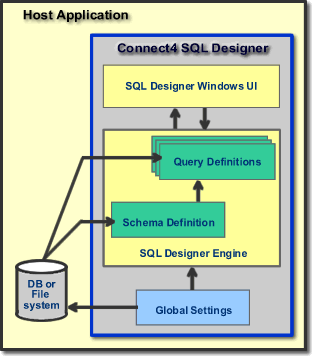
 SQL Designer consists of two component parts:
SQL Designer consists of two component parts:
SQL Designer Engine
SQL Designer User Interface
The Engine component does the work of managing the schema and query design, evaluating the database and SQL rules, and generating the SQL output from a loaded query.
The User Interface component allows the user to define schemas, queries and other global data types that can be defined to assist with the process of creating and managing queries.
From a data perspective, SQL Designer manages three types of data:
Global
Settings
This data document consists of all of the configuration data that supports
the creation of schemas and queries. It
includes comparison type definitions that are used in query criteria and
function definitions that are used to supply values like "This Financial
Year" to query criteria.
Schema
Definitions
Every query in SQL Designer is originally derived from a Schema. A
schema is basically a collection of meta-data that describes the database
objects and the relationships that exist between those objects. The
schema effectively describes what tables and fields may be used in a query
and holds the rules and methods that determine how you want to allow queries
to be constructed when using that schema.
Query
Definitions
The third data type of SQL Designer data is the query definition its-self.
The query definition derives its rules and object information from the
meta-data in the Schema object. To create a query, you first select the
schema that defines the area of the database which you wish to query.
When designing
a query, you use the user Interface to build one or both of
Return Set - a list of all the data fields that you want returned as part of the query results, and;
Criteria set - a definition of the criteria (and/or filters) that you want to apply to the query. Criteria may be simple equations such as "field = value", or, they may be more sophisticated combinations of equations, functions, user prompts and/or other field values.
Management of these data elements are integrated into SQL designer host applications using a simple list of events to which the host application subscribes. These data elements are simple XML formatted text files and SQL Designer exposes methods that manage these data elements residing on the file system, or persisted within your host application via the database or any other mechanism that your host application employs.
The sample application's source code demonstrates how to hook up these events and the few simple lines of code that your host application need employ to manage these resources.
For a discussion on approaching the setup of SQL Designer in your application, refer to the next topic in this chapter on Getting Started Steps.