 Selecting Other Databases
The SQL Designer Sample Application ships with a sample Access database (westwind.mdb) and some sample schemas and queries for that database. When the Sample Application is run for the first time, these sample data files are copied to the current user's Local Data Directory at <UserProfileRoot>\Local Settings\Application Data\Connect4\SQLDesignerSample1. De-installing and/or re-installing the sample application will not further modify the sample application data files. You will need to remove these files manually if you wish them to be removed or reinstalled the next time the sample application is run.
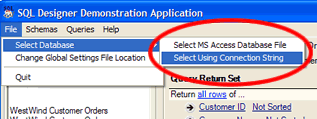
Selecting Other DatabasesYou may point the SQL Designer sample application to any other database and directory to use an alternate data source. To do this, choose the appropriate connection method from the File | Select Database menu option in the Sample Application.
 To connect to an access database, choose the database
file name. Schema
and Query files will be stored in the same directory as the database file.
To connect to an access database, choose the database
file name. Schema
and Query files will be stored in the same directory as the database file.
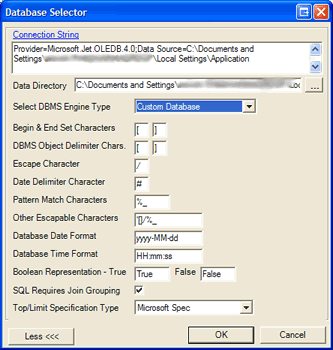
For any other database type, you will need to specify connection by a connection string and then also choose a directory on your file system in which you wish to store schema and query files for that database.
The dialog window for specifying a connection string also has a link to assist with specification of the correct connection string for your desired database. This link (to www.connectionstrings.com) is provided as a convenience only. Connect4 has no affiliation with the providers of that web site, but we do find it a most helpful resource.
It is also worth noting that on this database selection dialog, you may specify almost any type of DBMS engine, either directly, or, by selecting custom and setting individual properties to configure SQL Designer to produce the correct syntax for SQL for that database.